
How Windows Works Behind the Scenes: A Pentester’s Field Guide
Windows might seem like a maze of pop-ups, processes, and services — and that’s because it is. For pentesters, understanding how these core parts of the operating system fit together is crucial. It’s how you move stealthily, escalate privileges, set persistence, and stay undetected.
The Foundation: User Mode vs Kernel Mode
- Kernel Mode: Where the OS core, drivers, and sensitive system components live.
- User Mode: Where regular applications (like browsers, PowerShell, malware) run.
Pentesters operate mostly in User Mode, but understanding both helps during privilege escalation and process injection.
Processes: The Heartbeat of Windows
- A process is an instance of a running program.
- Every app, script, or service you start becomes a process.
- Each process:
- Has a PID (Process ID)
- Runs under a user context
- Loads DLLs (code libraries) to function
- Can contain threads (units of execution)
Get-Process
# Lists running processes
Services: Windows Background Workers
- A service is a background task managed by Windows.
- Services can:
- Start on boot
- Run in the background invisibly
- Run as SYSTEM, NETWORK SERVICE, or a regular user
- When a service starts, Windows launches it as a process — often inside svchost.exe.
Get-Service | Where-Object {$_.Status -eq "Running"}
# Lists all running services
Pentesting tip: Look for services with modifiable binaries or weak configurations.
Services vs Processes
| Term | Description | Example |
|---|---|---|
| Service | Background-managed component | wuauserv (Windows Update) |
| Process | Actual running instance of a program | svchost.exe hosting wuauserv |
- Many services run inside shared host processes, like
svchost.exe. - One process can host multiple services to conserve memory.
tasklist /svc
# Shows which services are running inside which processes
DLLs: Dynamic Link Libraries
- DLLs are shared code libraries that processes load as needed.
- A process can load dozens of DLLs to handle tasks like networking, I/O, crypto, UI, etc.
Get-Process -Id <PID> | Select-Object -ExpandProperty Modules
# Lists DLLs used by a specific process
Attack tip: DLL hijacking is common — placing a malicious DLL where a process expects a legit one.
WMI: Stealthy Access to Everything
WMI (Windows Management Instrumentation) is a built-in interface for querying and interacting with system components.
Why pentesters use it:
- Native to Windows
- Stealthier than PowerShell
- Allows remote execution
- Can be used for persistence
Get-WmiObject Win32_OperatingSystem
# System info

Invoke-WmiMethod -Class Win32_Process -Name Create -ArgumentList "cmd.exe"
# Spawns a process silently
Lateral movement tip: Use wmiexec.py (Impacket) to execute commands remotely.
PowerShell: Scriptable Admin Control
- PowerShell is a powerful admin shell built on .NET.
- It gives you full access to the Windows API and system internals.
- Used for automation, recon, execution, and scripting attacks.
Get-LocalUser
whoami /priv
Start-Process "calc.exe"
Detection note: PowerShell is heavily logged by default (Event ID 4104, AMSI, etc.).
The Registry: Windows’ Central Brain
- The registry is a hierarchical database of system and application settings.
- It’s used for:
- Autostart programs
- Service configs
- User preferences
- Installed software
Common Hives:
HKLM: HKEY_LOCAL_MACHINE (system-wide)HKCU: HKEY_CURRENT_USER (user-specific)
Get-ItemProperty -Path "HKLM:\Software\Microsoft\Windows\CurrentVersion\Run"
# View autostart programs
Persistence tip: Drop a key into a Run path to re-execute payloads on reboot or login.
Scheduled Tasks: Built-in Persistence
- Scheduled Tasks allow Windows to run commands or scripts on a timer or event.
- Can be abused for:
- Fileless persistence
- Privilege escalation
- Execution at login or system boot
Get-ScheduledTask
# Lists all tasks

schtasks /create /tn evil /tr "C:\reverse.exe" /sc minute /ru SYSTEM
# Creates a malicious scheduled task
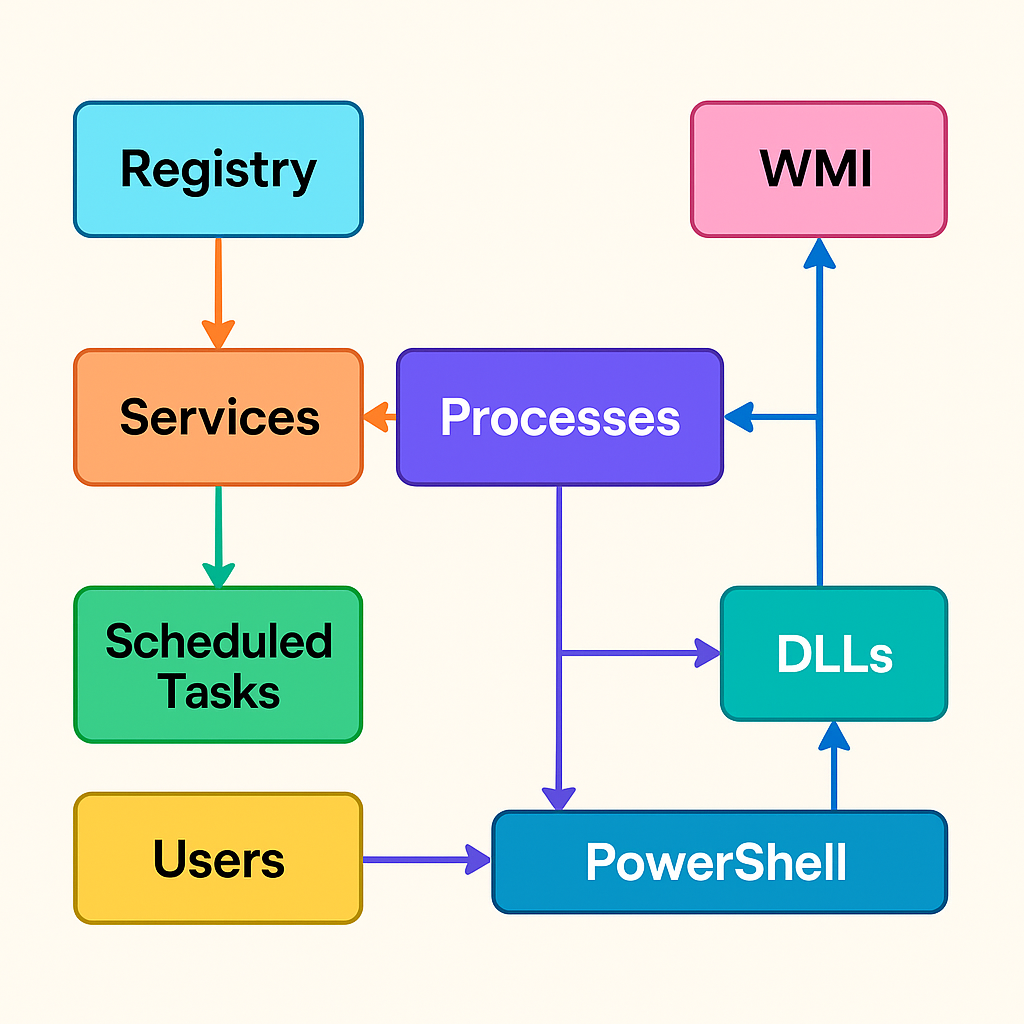
How It All Connects
- A service (like Windows Update) is defined in the registry
- At boot, Windows starts the service — it spawns a process
- The process loads required DLLs to operate
- An admin or attacker uses PowerShell or WMI to query or control the system
- Persistence can be set using:
- The registry
- Scheduled Tasks
- WMI Event Subscriptions
Visual Flowchart
Pentester Cheat Sheet
| Task | Tool or Technique |
|---|---|
| Enumerate users | Get-LocalUser, WMI |
| List services | Get-Service, sc query |
| Process recon | tasklist, Get-Process |
| DLL hijack | Replace expected DLL in path |
| Remote execution | Invoke-WmiMethod, wmiexec.py |
| Persistence | Registry run key, WMI subscription, Scheduled Task |
| PrivEsc | Misconfigured services, token abuse, UAC bypass |
Suggested Labs
- TryHackMe: Windows Fundamentals
- Hack The Box: Blue, Bastard, Forest
- Build a Windows VM and practice PowerShell, WMI, and DLL hijacking techniques