
Active Directory : Introduction to (AD)
Outline:
- What is Active Directory?
- Why AD is important in cybersecurity
- Core AD components (domains, forests, OUs, GPOs)
- Basic AD objects (users, computers, service accounts, groups)
- AD security groups explained
- Organizational Units (OUs) in depth
- Group Policy Objects (GPOs)
- AD authentication: Kerberos and NTLM
- Common AD ports
- How to identify AD environments
- Suggested labs and TryHackMe rooms
1. What Is Active Directory?
Active Directory (AD) is Microsoft’s centralized identity and access management (IAM) system. It allows organizations to manage users, devices, permissions, and policies from a central location — the Domain Controller.
Think of AD as the central nervous system of a Windows network. It decides:
- Who can log in
- What they can access
- How policies are enforced
In pentesting, AD is a high-value target — because controlling AD means controlling the network.
2. Why Is AD So Important in Cybersecurity?
AD is used in nearly all enterprise networks. It stores and manages:
- User credentials and hashed passwords
- Trust relationships between systems
- Group memberships (like Domain Admins)
- Policies that affect every user and machine
- Access to shared drives, printers, and applications
Attackers abuse AD to escalate privileges, move laterally, and maintain persistence. It’s the crown jewel in a red teamer’s eyes.
3. Core Concepts in AD
| Concept | Explanation |
|---|---|
| Domain | A logical boundary grouping users, computers, and resources under one administrative unit. Think: corp.local. |
| Forest | A collection of one or more domains that trust each other. All domains in a forest share a global catalog and schema. |
| Tree | A group of related domains with a shared namespace (e.g., sales.corp.local, hr.corp.local). |
| Organizational Unit (OU) | Logical containers for organizing AD objects like users, groups, and computers. Used for delegation and applying Group Policy. |
| Domain Controller (DC) | A server that runs AD Domain Services (AD DS) and handles authentication and directory services. |
| Trusts | Relationships between domains that allow users in one domain to access resources in another. Can be one-way or two-way. |
| Global Catalog | A distributed data repository that helps locate objects in any domain of the forest. |
4. Basic Objects in Active Directory
These objects are the DNA of an AD environment:
- Users: Human or service accounts. Target for attacks like password spraying, AS-REP roasting.
- Groups: Collections of users. Often used to assign permissions or control access.
- Computers: Domain-joined endpoints. Can be used for lateral movement or privilege escalation.
- Service Accounts: Used by applications or services. These often have elevated privileges and weak passwords.
- GPOs: Manage how systems behave (e.g., enforce password complexity, firewall settings).
5. Understanding AD Security Groups
Security groups are used to manage permissions and access control. You’ll encounter these often during enumeration:
Common Built-in Groups:
| Group | Description |
|---|---|
| Domain Admins | Full control over all AD objects. Owning this = owning the domain. |
| Enterprise Admins | Highest privilege across all domains in a forest. Used for forest-wide changes. |
| Schema Admins | Can modify the AD schema (rarely used but very powerful). |
| Administrators | Local admin access on Domain Controllers. |
| Users | Default group for regular domain users. |
| Account Operators | Can create and manage user accounts (limited power, still dangerous). |
| Backup Operators | Can bypass file permissions to perform backups — useful for credential theft. |
| Print Operators | Can manage printers, but can also restart the Print Spooler (used in PrintSpoofer attacks). |
As a pentester, group membership can be your stepping stone to privilege escalation.
6. Deep Dive: Organizational Units (OUs)
OUs are logical containers used to structure AD objects. They help with:
- Delegating administrative control (e.g., HR admins manage only HR users)
- Applying Group Policy to specific departments
- Organizing users by department, location, or function
Example Real-World Active Directory OU Structure: corp.local
corp.local
├── Users
│   ├── HR
│   │   ├── HR_Admins
│   │   └── HR_Staff
│   ├── IT
│   │   ├── IT_Admins
│   │   ├── IT_Security
│   │   └── IT_Support
│   ├── Finance
│   │   ├── Finance_Admins
│   │   └── Finance_Staff
│   ├── Sales
│   │   ├── Sales_Managers
│   │   └── Sales_Reps
│   └── Executives
│       ├── C-Level
│       └── Executive_Assistants
│
├── Computers
│   ├── Workstations
│   │   ├── HR_Workstations
│   │   ├── IT_Workstations
│   │   ├── Finance_Workstations
│   │   ├── Sales_Workstations
│   │   └── Executive_Workstations
│   └── Servers
│       ├── File_Servers
│       ├── Domain_Controllers
│       ├── SQL_Servers
│       ├── Web_Servers
│       └── Application_Servers
│
├── Service Accounts
│   ├── SQL_Service
│   ├── WebApp_Service
│   ├── Backup_Service
│   ├── Print_Service
│   └── Monitoring_Agents
│
├── Groups
│   ├── HR_Groups
│   ├── IT_Groups
│   ├── Finance_Groups
│   └── Sales_Groups
│
├── Policies
│   ├── Password_Policies
│   ├── Software_Restrictions
│   ├── Drive_Mapping
│   └── Firewall_Rules
│
└── External
    ├── Vendors
    ├── Contractors
    └── Temporary_Accounts
Why This Matters for Pentesters:
This kind of setup gives attackers a roadmap of the organization. Understanding how OUs are laid out helps you:
- Target privileged users in groups like
IT_AdminsorC-Level - Look for weak GPOs applied to
Workstations(e.g., drive mapping scripts or credential exposure) - Hunt for exposed service accounts like
Backup_Servicethat may have high privileges and weak passwords - Use naming conventions to guess other assets or accounts (e.g., if
SQL_Serviceexists, so mightSQL_Admin) - Identify lateral movement paths, e.g., a
Finance_Staffuser with access to shared drives used byFinance_Admins
7. What Are Group Policy Objects (GPOs)?
GPOs are settings applied to users or computers in an AD environment. They are linked to sites, domains, or OUs.
What Can GPOs Do?
- Enforce password policies
- Disable/control USB drives
- Deploy software
- Set login scripts
- Configure local admin groups
- Set startup/shutdown tasks
Pentester Tip:
Misconfigured GPOs can lead to privilege escalation. For example:
- A GPO adds a user to the local Administrators group on all machines.
- A GPO runs a startup script with credentials hardcoded in plaintext.
Use tools like gpresult /r, grouppolicy.html, or BloodHound to analyze GPOs during an engagement.
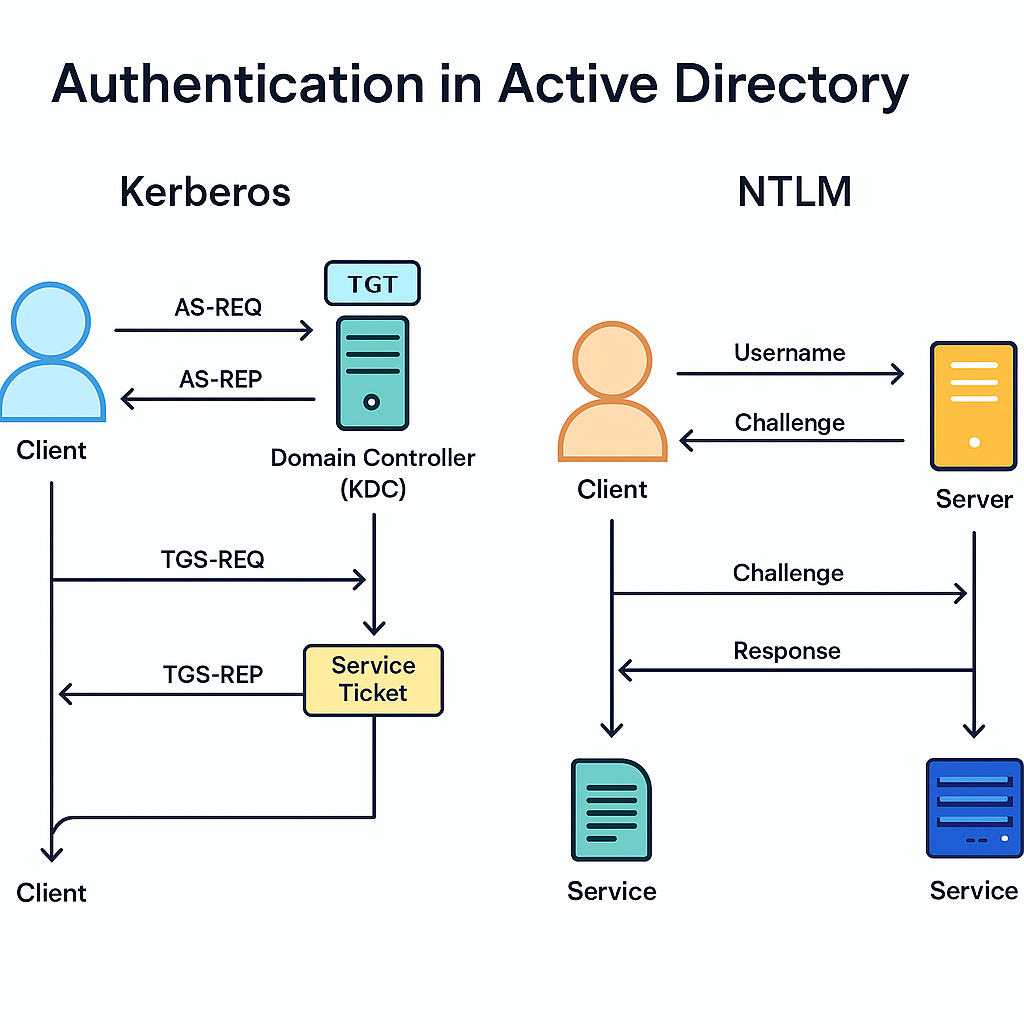
8. Authentication in Active Directory (Expanded)
Active Directory primarily relies on two authentication protocols:
- Kerberos — the modern standard
- NTLM (NT LAN Manager) — the legacy fallback
Each protocol plays a huge role in the attack surface of an AD environment. Let’s break them down.
Kerberos: The Modern AD Authentication Protocol
Kerberos is the default authentication protocol in Windows domains since Windows 2000. It’s designed to be more secure than NTLM by using tickets instead of password hashes for authentication.
How Kerberos Works (Simplified):
- AS-REQ: The user sends an Authentication Service Request to the Key Distribution Center (KDC — part of the Domain Controller).
- AS-REP: The KDC replies with a Ticket Granting Ticket (TGT) encrypted with the user’s password hash.
- The user decrypts the TGT (proving their identity) and stores it in memory.
- To access a service (like SMB), the user presents the TGT and requests a Service Ticket (TGS).
- The KDC issues the TGS, which is then used to authenticate to the target service.
Common Kerberos Attacks:
| Attack | Description |
|---|---|
| Kerberoasting | Extract service tickets for accounts with SPNs and crack them offline to recover service account passwords. |
| AS-REP Roasting | If a user has “Do not require Kerberos preauthentication” enabled, you can request an AS-REP encrypted with their hash and crack it offline. |
| Golden Ticket | Create a forged TGT using the KRBTGT hash (from the DC) and impersonate any user, even Domain Admin. |
| Silver Ticket | Forge a TGS using a service account hash to access specific services (like CIFS or HTTP) without a TGT. |
| Pass-the-Ticket | Reuse a stolen TGT or TGS from memory (via Mimikatz or Rubeus) to access resources without a password. |
Tools Used:
- Rubeus — Extract, request, inject, or forge Kerberos tickets.
- Mimikatz — Dump TGTs/TGSs and perform Golden/Silver ticket attacks.
- Impacket — Toolkit with Kerberos attack support (e.g.,
GetUserSPNs.py,ticketer.py).
NTLM: The Legacy Protocol That Just Won’t Die
NTLM (NT LAN Manager) is a challenge-response protocol based on password hashes. It’s older and less secure than Kerberos, but still widely used — especially by:
- Legacy systems
- Misconfigured services
- Applications that don’t support Kerberos
- Local account logins
How NTLM Works (Simplified):
- Client sends a username to the server.
- Server replies with a challenge (nonce).
- Client encrypts the challenge with the hash of the user’s password and sends it back.
- Server verifies it using the stored hash in the domain.
No ticketing system. Just hash-based magic — which is bad for security.
Common NTLM Attacks:
| Attack | Description |
|---|---|
| Pass-the-Hash (PtH) | Reuse the NTLM hash of a user without cracking it to authenticate as them. |
| NTLM Relay | Intercept NTLM authentication and relay it to another system, often gaining privileged access. |
| Credential Forwarding | Abuse protocols like WinRM, RDP, or WMI where credentials can be auto-forwarded and reused. |
Important: NTLM hashes can be dumped with tools like Mimikatz or found in LSASS memory or SAM hives.
Pentester’s Perspective: Why It Matters
As a pentester, understanding how these protocols work lets you:
- Know where to look for tickets and hashes
- Choose the right attacks based on the protocol in use
- Identify weak or misconfigured accounts ripe for roasting or relaying
- Move laterally and escalate privileges more effectively
When you get a foothold, these protocols are your bridge to full domain compromise.
Summary: Tools for Protocol Abuse
| Tool | Description |
|---|---|
| Rubeus | Kerberos ticket interaction (roasting, forging, renewal) |
| Mimikatz | Extract credentials, hashes, and Kerberos tickets from memory |
| Impacket | Suite of tools for NTLM/Kerberos attacks (Python-based) |
| Responder | Poison LLMNR/NBTNS to capture NTLM hashes |
| NTLMRelayX | Relay captured NTLM auth to other services |
| CrackMapExec | Credential spraying, relay support, and service enumeration |
Takeaway
Kerberos is the king of modern Windows authentication — but even kings bleed. NTLM is the rotting skeleton of legacy networks — and attackers still feast on it.
As a pentester:
- Know how to detect which protocol is in use
- Understand how tickets and hashes behave
- Be ready to exploit both — because most real networks have both in play
9. Common Ports in Active Directory
| Port | Protocol | Purpose |
|---|---|---|
| 88 | TCP/UDP | Kerberos authentication |
| 135 | TCP | Microsoft RPC |
| 139 | TCP | NetBIOS |
| 389 | TCP/UDP | LDAP (user directory lookups) |
| 445 | TCP | SMB (file sharing, authentication) |
| 464 | TCP/UDP | Kerberos password changes |
| 3268 | TCP | Global Catalog |
| 5985 | TCP | WinRM (PowerShell Remoting) |
Run this Nmap scan to detect an AD environment:
nmap -sS -sV -p 88,135,139,389,445,464,593,3268,5985 10.10.10.10
10. How to Identify an AD Environment
Look for signs like:
- Hostnames starting with
dc01,dc02, etc. - Open ports related to Kerberos, LDAP, SMB
- Shares named
SYSVOL,NETLOGON - Domains in login prompts (
domain\user) - Responses to LDAP/Kerberos enumeration
- DNS suffixes like
.local,.corp,.internal
Use tools like:
nmap,rpcclient,ldapsearch,crackmapexec- BloodHound for mapping users/groups/privileges
Wrapping Up
You’ve just laid the groundwork for mastering Active Directory as a pentester. Now you know:
✅ What AD is and why it’s mission-critical
✅ The structure of domains, forests, and OUs
✅ The key groups and how permissions are controlled
✅ How authentication works with Kerberos and NTLM
✅ What to look for during recon and enumeration
In Part 2, we’ll dive into Active Directory enumeration — how to map users, groups, and trust relationships using real tools and techniques.